

Goal:
Have Ansible manage the department based groups in an organization.
The goal is to use the user department attribute in AD to maintain department based group membership for the organization.
Requirements:
- Ansible – I am using 2.8.5
- An AD account that can and create update AD groups
- Pywinrm installed on the Ansible control node
- A target domain controller you have Configured for Ansible Remoting
- A host_vars with the windows requirements for….
- ansible_connection: winrm, ansible_port:, ansible_user: who can do the AD things and all of that good stuff
The Playbook
The idea was to create a playbook that was reusable by all department groups and extra vars could be passed to ansible-playbook to determine the group name and it's members. Long term explore a Galaxy role for the playbook.
Playbook Hosts
The playbook host will need to be one domain controller
Playbook variables
department_name: The department name
ou: The destination OU for the group
- name: AD - Department Security Group Maintenance Playbook
  hosts: domaincontroller
  gather_facts: no
  vars:
    - department_name: <groupname>
    - ou: <ou_distinguished_name>
Playbook tasks
- Get the users from AD using the AD cmdlet and only returning the samaccountname attribute in a register called ad_users_list
- name: Get department_name users
  win_shell: (get-aduser -LDAPFilter "(department={{ department_name }})").samaccountname
  register: ad_users_list
  changed_when: False
- Verify that the group exists and create if necessary.
- We are also setting the description and displayname attributes
- This is also set as a Universal group and can be changed to fit your needs
- name: Make sure the group exists and the attribute are correct
  win_domain_group:
    name: "{{ department_name }}_department"
    attributes:
      description: Ansible Managed Group
      displayname: "{{ department_name | title }} Department"
    scope: universal
    state: present
    category: security
organizational_unit: "{{ ou }}"- Use the ad_users_list register stdout_lines as the list to provide to the win_domain_group_membership module.
- name: Build the member list
  win_domain_group_membership:
    name: "{{ department_name }}_department"
    members: "{{ ad_users_list.stdout_lines }}"
    state: pure
And that's it..
Assuming you hard code the OU in the playbook you can run the playbook like below with "{{ department_name }}" as the same named variable in the playbook and the name provided as an extra variable to ansible-playbook.
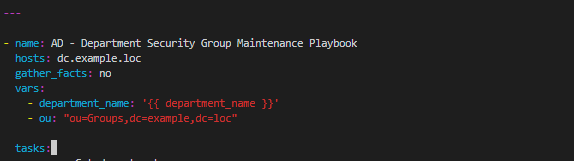
Run the playbook with ansible-playbook and remember to single quote your variable data to account for spaces etc…
ansible-playbook pb.ad_department_group.yml -e "department_name='information technology'" -vvvNext I would probably put this in a Job Template in Tower and schedule it to run on a cadence.
Get the code here..