

Skip to content
Welcome
  • Home
  • about the author
The OpsCorner
The OpsCorner
  • Home
  • about the author

The OpsCorner

A documentation repository of loosely related topics

  • Home
  • about the author
Software / Technology

VM Alarm Script

- October 7, 2019 | October 11, 2019 - Bryan McClellan

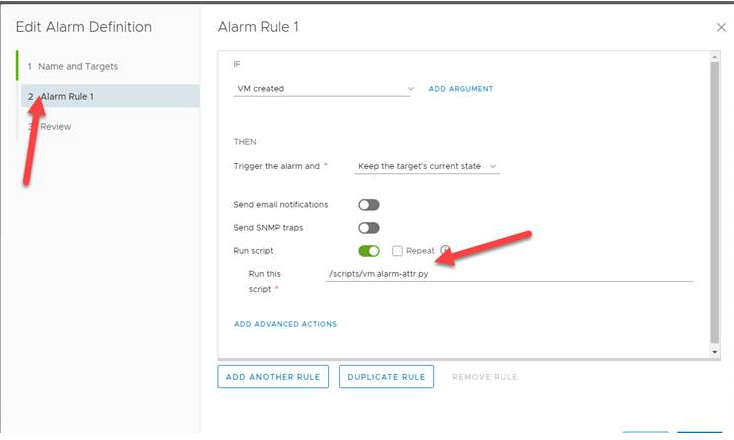
The python script here does the stuff below.

Although I built this to write the attributes you could easily stub in a CMDB or something and it would happen every time on create.

Could be to far out there but some cool stuff anyway.

You could also make those attributes whatever you wanted. I just used vm.owner as it was there when I was coding. It could be vm.creator or something. This also now has full access to the VM data so you could put whatever you wanted wherever.
And you get this. You can change the attribute names to fit your needs and add more if you like.
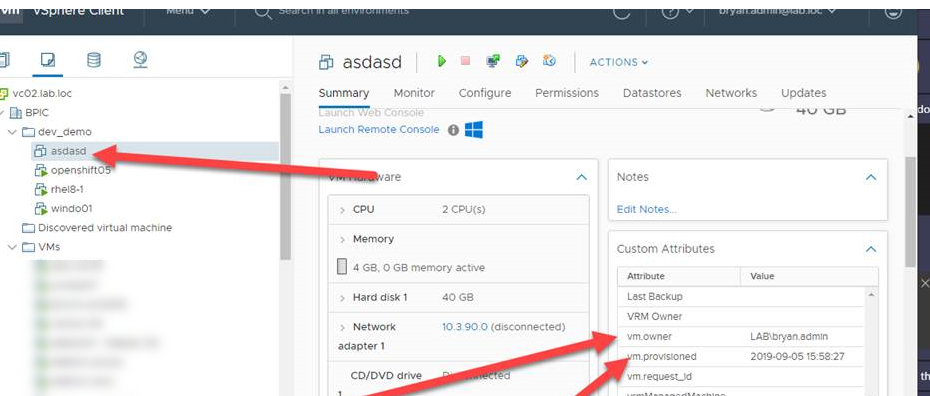
You could also easily use this for a power off action to track when and who powered off the machine. This could support a decom process.

Here is the code below.

Change the below variables in the code to an account allowed to write attributes.

host="vcenter", user="user", pwd="password"

Post navigation

How I use VSCode and Git
SANnav 2.0 Single Node Install

Recent Posts

  • Dell OpenManage Enterprise API PowerShell Scripts September 18, 2020
  • Ansible Workshop from Anywhere August 31, 2020
  • VMware Webinar Series July 27, 2020
  • Using the default VMware-Privileged PodSecurityPolicies on TKG June 30, 2020
  • VM Template Updater with Ansible April 24, 2020

Tags

Active Directory Ansible Automation azure-devops Brocade Dell Device42 Fiber Channel Free Code Kelverion Kubernetes NSX NSX VMware powershell Python SANnav Scripts servicenow source-control Tanzu TKG Tower Vagrant VMware vRo VSCode vsphere

Site Pages

  • about the author
© 2026 The OpsCorner | Built with Xblog Plus free WordPress theme by wpthemespace.com